

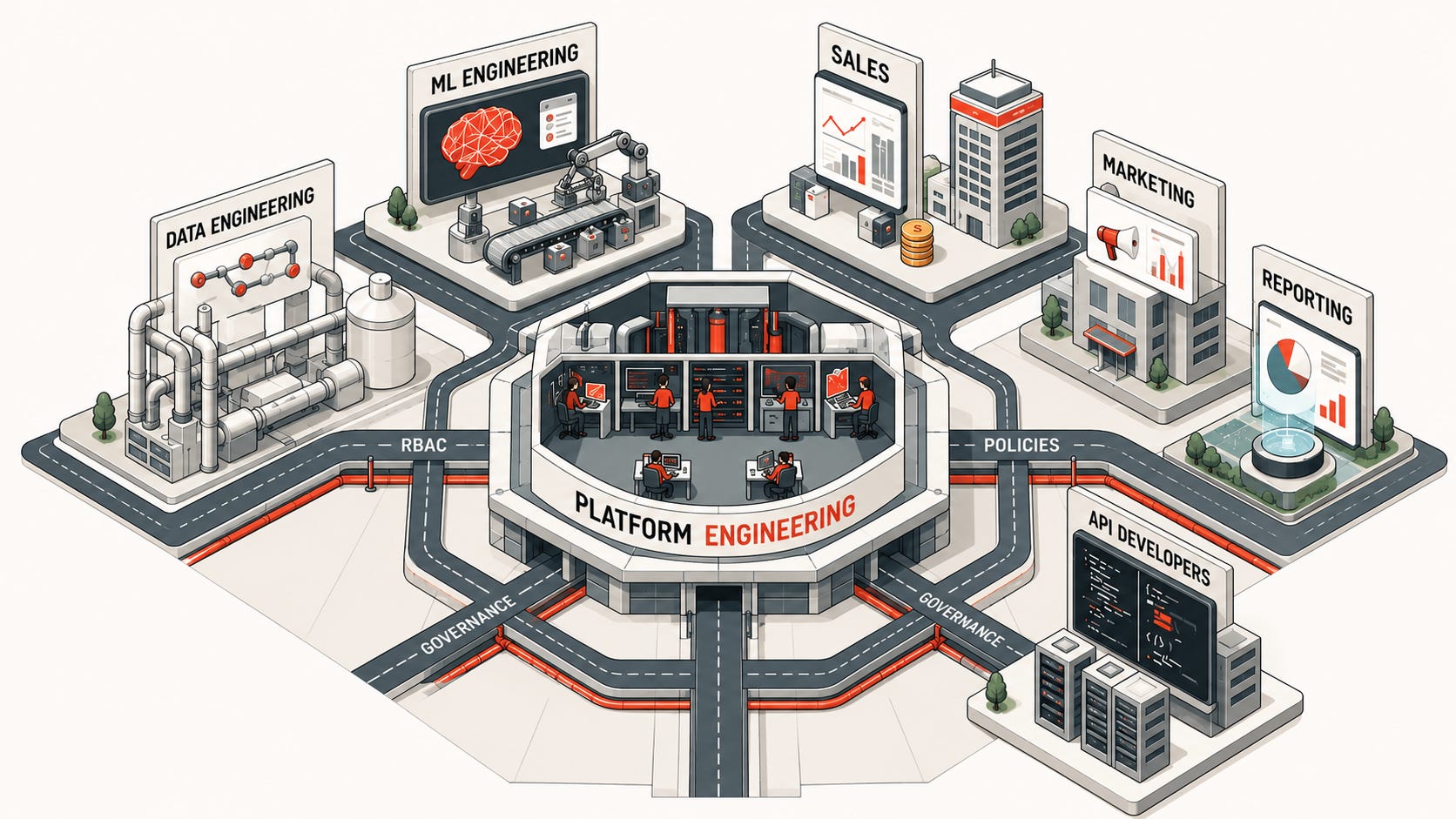
This article is long, but no AI and no fluff. Only the thumbnail image used AI, while every word and diagram hereafter is written by my own human hands. Let’s get that out of the way first.
“A good tool improves the way you work. A great tool improves the way you think.” - Jeff Duntemann
I’ve designed, built, and operated several Databricks deployments over the years. Long-term technical success is almost always coupled with good systems design thinking when standing up and managing the platform. Today, I’ll share what I consider one of the strongest, most well-rounded, Databricks platform architectures.
Not all possible patterns, but a really good one. My hope is that even if you don’t copy this exactly, providing such an end-to-end example will give you the principles and ideas to design around.
Workspaces
Workspace Considerations
Everything begins with the workspace, which:
Serves as a primitive environment boundary.
Is associated with a VPC, and therefore acts as a level for network boundaries too.
Is the scope for certain resource quotas.
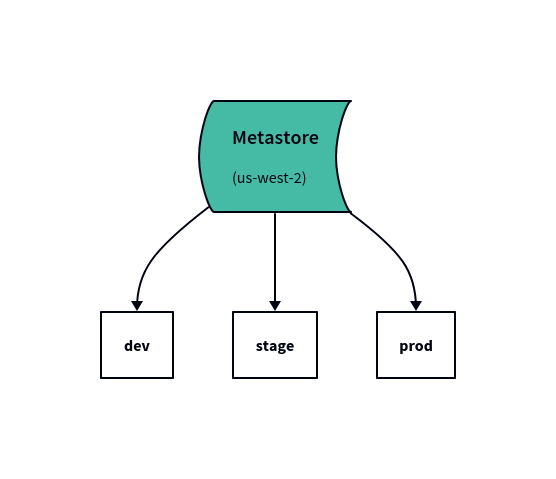
Is associated with a Metastore, which also means it is associated with a cloud region and data residency goals.
Can optionally represent an organizational container for large enterprises.
See here for more reasons to split workspaces.
Note: throughout this article, I’ll use the term “environment” to refer to logical Software Development Lifecycle (SDLC) tiers, such as dev, test, and prod.
Workspace Landscape
For our workspaces, the simple landscape doesn’t need much:
DEV - a workspace for iterative development, experiments, hacking on things, feature development… this is where engineers do things with hands on keyboard (and agents too, nowadays).
STAGE - let’s not nitpick naming “test” vs. “stage” — the point is all software needs to be tested. This workspace is for automated testing, especially integration and end-to-end testing.
PROD - live production, real data. Needs no explanation, except that you shouldn’t be deploying here manually.
Note: if you expect to use, or expand into, multiple regions, include a geo abbreviation in the workspace names, like “produs” or “devuk".
Non-Technical Users
This works for engineering teams, but what about business users and less-technical analysts? You could carve out a separate workspace and call it “reporting” or “analytics” but if it access production data, you should still classify it as a “production” tier environment.
To be honest, we can usually just use PROD but with good guardrails. This is the simpler, but don’t freak out, you’ll see what I mean by “guardrails” when we get to Unity Catalog and Groups.
Networking
We won’t derail on networking for this guide, because there are plenty of guides and Terraform examples on that already. See here.
Just remember, workspaces are a fundamental “container” of sorts for compute and are assigned a VPC. You probably don’t want DEV and PROD sharing the same VPC, so choose your networking appropriately.
Design Unity Catalog Layout
Catalog Considerations
Metastore = regional. For this guide, we’ll assume 1 region, so 1 metastore.
Catalogs can be bound to a workspace, enforcing which workspaces can access the catalog.
Catalogs can have a default storage location (S3/ADLS/GCS). Schemas can do this too, but we won’t set it at that level for now. For each catalog, create a separate S3 bucket:
Encrypt the bucket with KMS, key rotation enabled, S3 versioning disable (or use a lifecycle policy to delete noncurrent version objects), and conventional tags on the bucket.
Configure the Catalog’s default storage location to
s3://<catalog-bucket>/catalog-default/
Schemas do NOT have the same workspace binding concept like Catalogs, so never mix two different SDLC environments (e.g., DEV + PROD) within the same catalog.
Catalogs will be our top-most container for access grants.
Domain Catalogs
From here on out, let’s make up a new term: domain. A domain be anything, pick a meaning that makes sense for your org. Examples are domain = a Business Unit (BU), product line, combination of the two, etc. For our example, let’s say these are our domains:
reporting (the BI/reporting team)
sales
eng
Also, don’t worry about who/how/where creates and manages these catalogs—we’ll get to that in the Repo Hierarchy section in a bit.
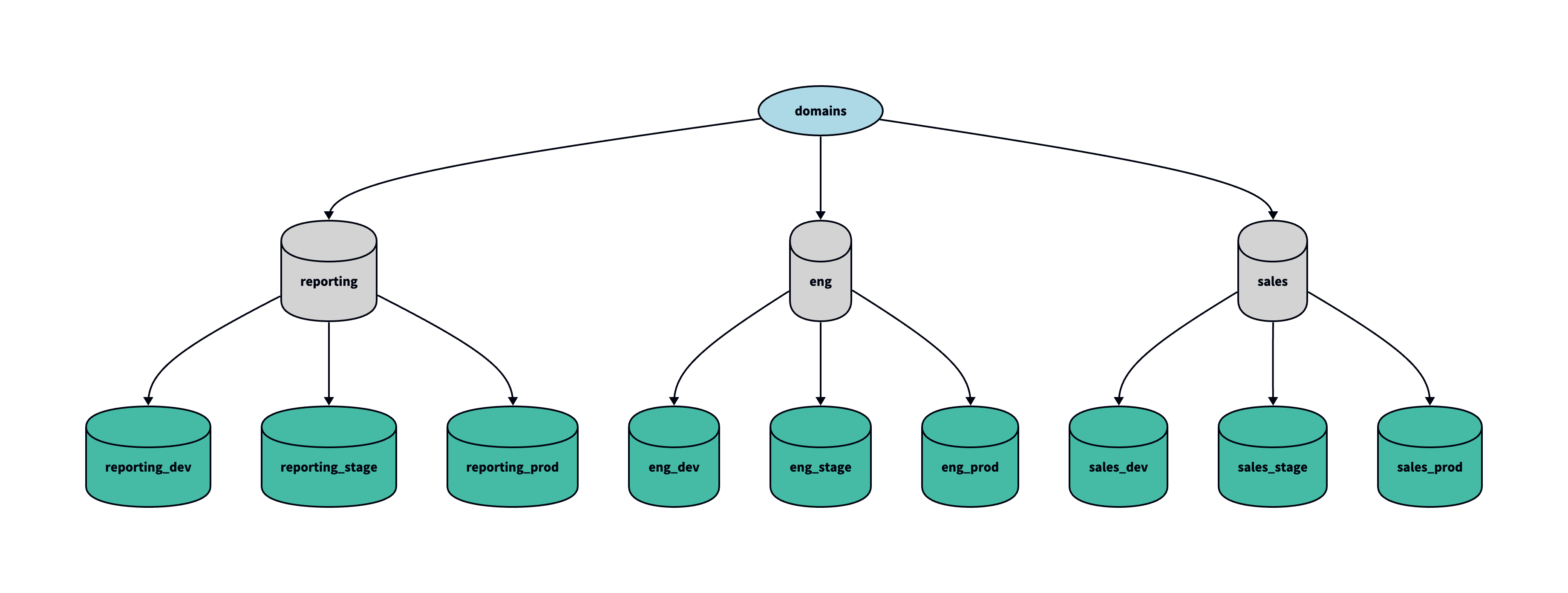
If we have 3 workspace environments (dev, stage, prod), we will create 3 catalogs, or N x M where N = environments and M = catalogs:
CATALOG_NAME = "<domain>_<env>"In other words, we’re implementing the hybrid catalog design pattern per the Well-Architected Framework (WAF). Again, my way isn’t the only way, but this way you see an end-to-end picture.
With our 3 domains from earlier, we should end up with 9 catalogs:
reporting_<dev|stage|prod>
sales_<dev|stage|prod>
eng_<dev|stage|prod>
Note: if you are worried about the number of catalogs creating visual clutter in the Catalog Explorer, remember catalog-workspace bindings will disable inaccessible catalogs when viewing the list in a particular workspace/environment. Admins may also hide catalogs that users don’t have access to.
Each of those has its own S3 bucket, tagged, etc. We also bind each catalog to their respective tier workspace: reporting_dev —> dev workspace, sales_stage —> stage workspace, etc.
Schemas
Two schools of thought that will go well with our chosen architecture:
Strongly governed schemas - define a standard set of schemas, like medallion layers “bronze”, “silver”, “gold” for each catalog.
Don’t create schemas - defer it to the owners operating in each catalog (e.g., reporting team gets to create their own schema layout in
reporting_<env>catalogs however they please).
Groups
Let’s pause for a moment. This next part is super important—it’s what will separate chaotic permission sprawl from a well-oiled and secure machine:
Grant permissions to Groups. Not users.
Roles
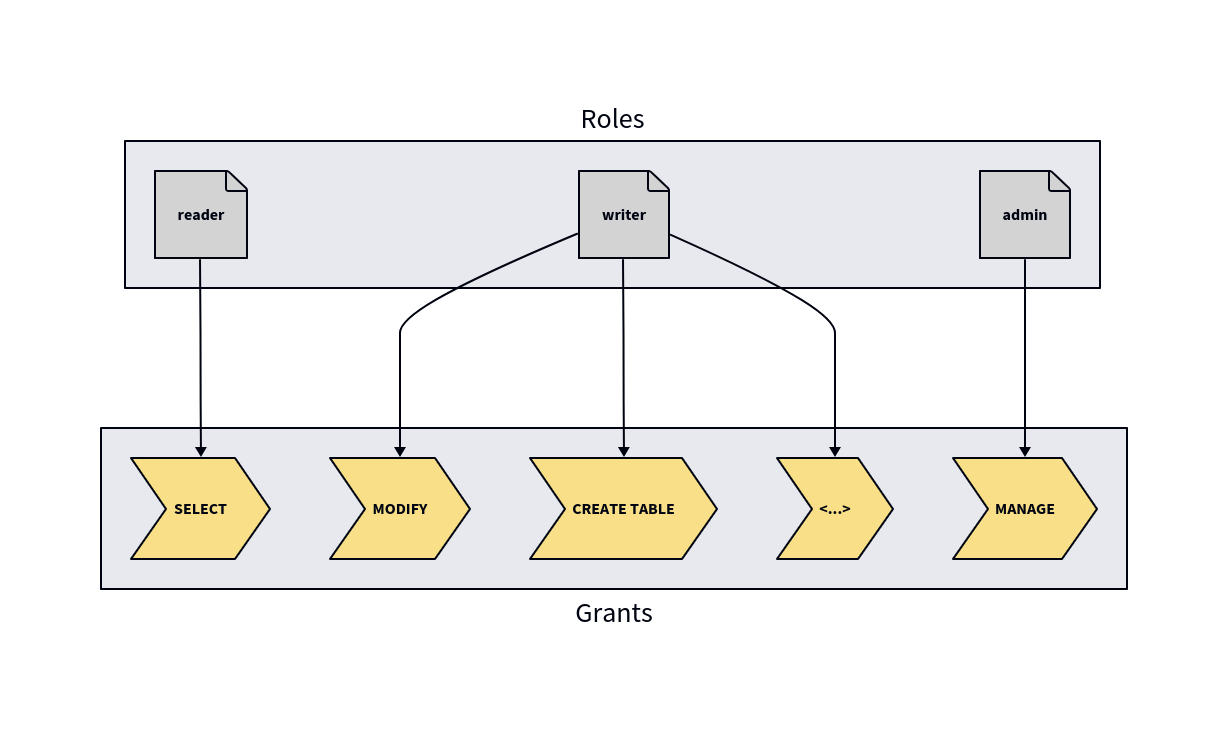
First, we need to establish a new standard for our organization. A standard set of roles:
reader - you have access to view the thing.
writer - you have access to modify/write to the thing.
admin - you have access to manage/administer the thing.
You could get creative and come up with more roles, but honestly this is usually all you’ll need.
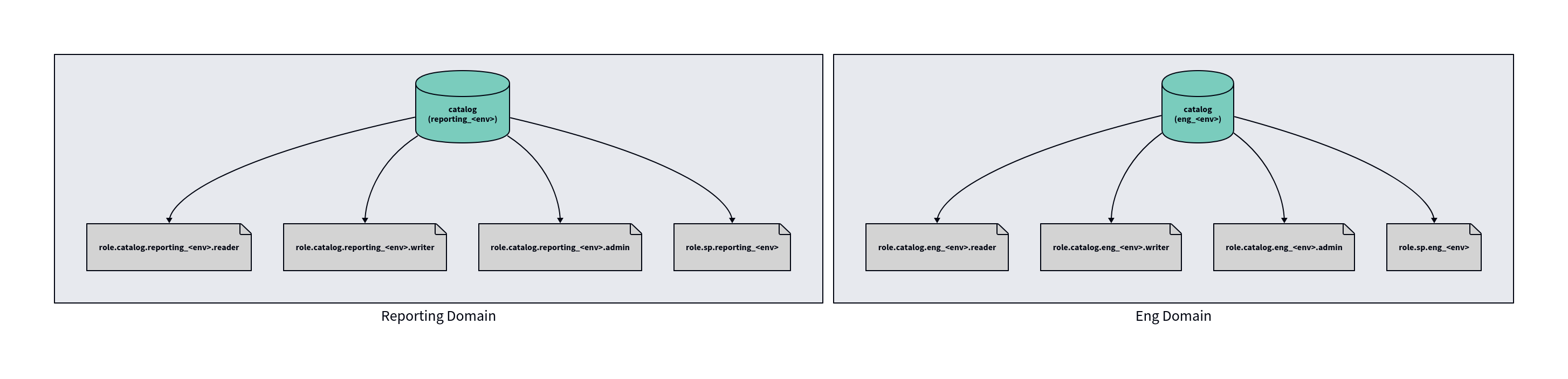
We then create N groups for each catalog:
GROUP_NAME = "role.catalog.<catalog_name>.<role_name>"For example, we would end up with:
role.catalog.sales_prod.reader
role.catalog.sales_prod.writer
role.catalog.sales_prod.admin
role.catalog.eng_stage.reader
role.catalog.eng_stage.writer
…
Role Grants
Backtrack a bit to when we chose our standard set of roles; at that point, we should’ve also defined which Unity Catalog GRANTS map to each role. For example, we can say:
reader
USE CATALOG
USE SCHEMA
SELECT
BROWSE
READ VOLUME
READ FEATURE
…
writer
MODIFY
CREATE FUNCTION
CREATE VOLUME
CREATE MODEL
CREATE TABLE
…
admin
MANAGE
ALL PRIVILEGES
…
Service Principals
Role-based groups covers most of what we need, but in production (and ideally staging too) we should be running jobs/pipelines/apps under a Service Principal, not an individual user (human).
However, to use Service Principals, users need the CAN_USE permission on it.
We can extend our library of standard roles to also include roles, which means more groups to create. Let’s do that:
GROUP_NAME = "role.sp.<domain>"Better yet, Service Principals often need to be split by environment, especially for CI/CD runners, so we could factor the env into the group name:
GROUP_NAME = "role.sp.<domain>.<env>"If we instantiate these standard resources for every domain we create, that becomes:
role.sp.eng.dev
role.sp.eng.stage
role.sp.eng.prod
role.sp.sales.prod
…
I know this is a lot of groups. I know. Be patient, we’re giong to address that very soon.
Rolesets
This part is optional, but cuts down on access requests greatly.
Say you are a developer in the data engineering team. Based on that job role, you determine that you need the following roles (aka groups):
role.catalog.eng_dev.writer
role.catalog.eng_stage.writer
role.catalog.eng_prod.reader
role.catalog.reporting_stage.reader
role.catalog.reporting_prod.reader
role.sp.eng.dev
role.sp.eng.stage
(a developer doesn’t need role.sp.eng.prod, only your CI/CD should have access to that!)
Phew, that’s a lot of access requests!
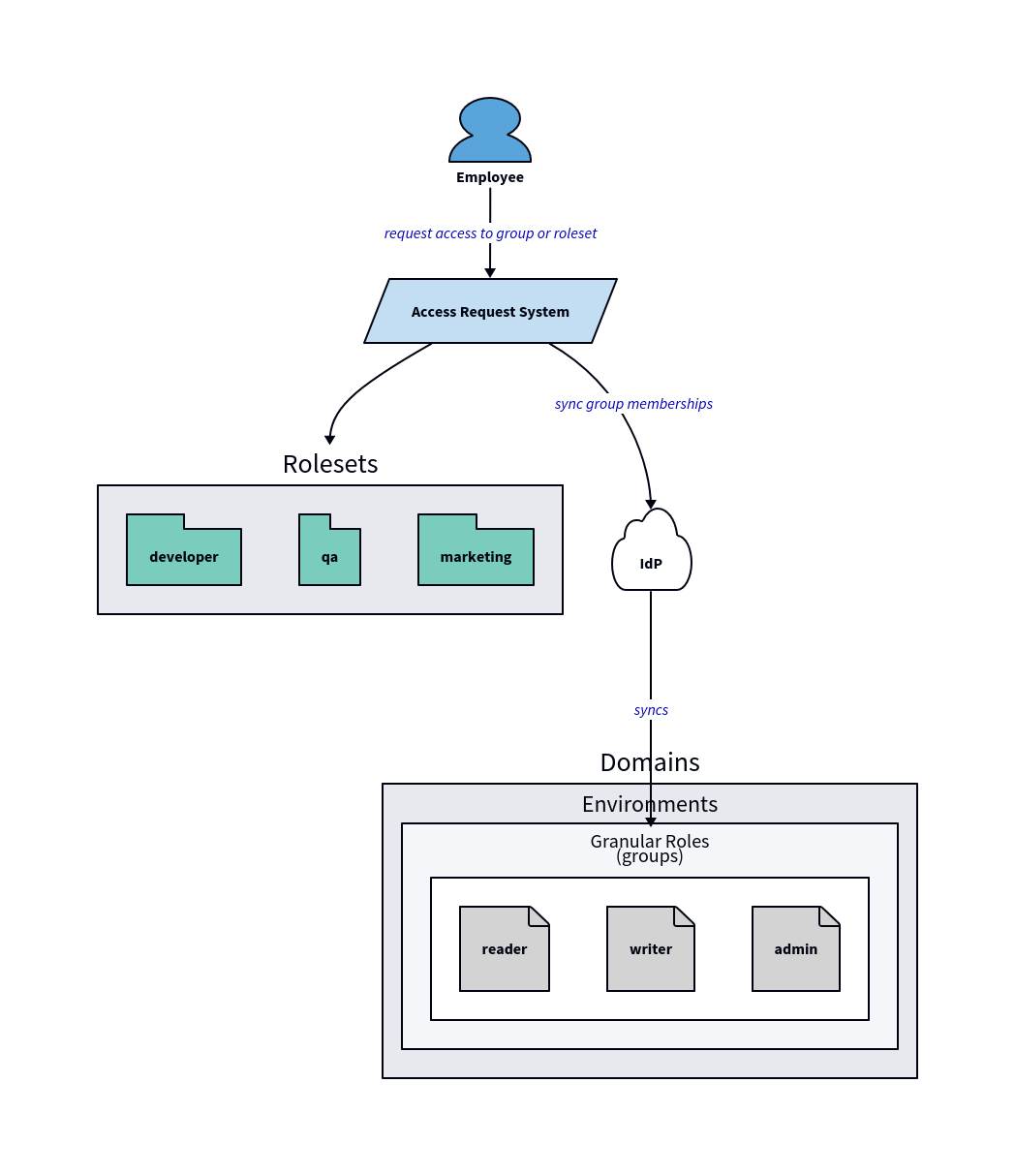
What we need is a clear separation of low-level roles from a persona-based preset of the roles that a certain job/team/etc. might need.
I like to call this a “roleset” — it’s literally just a set of roles. These are once again fairly arbitrary, but I recommend something truly team-based usually, for example:
Roleset: developer
role.catalog.eng_dev.writer
role.catalog.eng_stage.writer
role.catalog.eng_prod.reader
role.catalog.reporting_stage.reader
role.catalog.reporting_prod.reader
role.sp.eng.dev
role.sp.eng.stage
Roleset: qa
role.catalog.eng_stage.writer
role.catalog.eng_prod.reader
role.catalog.reporting_stage.writer
role.catalog.reporting_prod.reader
role.sp.eng.stage
Roleset: marketing
role.catalog.reporting_prod.reader
Roleset: platform-eng
role.catalog.eng_dev.admin
role.catalog.eng_stage.admin
…
Entra supports nested groups, which you could technically use to implement these, though the parent/child relationship would technically be inverted (e.g., imagine a group roleset.developer that is a member of the role.catalog.eng_dev.writer and therefore inherits the GRANTS you provide to the role).
Please note that some IdPs (Okta) may not support syncing nested groups, and generally speaking it’s better to avoid complexity of nested groups and instead perform the group collections/presets in a dedicated access request system, like Opal.
Syncing from your Identity Provider (IdP)
I just mentioned IdP (Identity Providers), so it’s worth stating you should absolutely be using Automatic Identity Management (AIM). You can also use System for Cross-domain Identity Management (SCIM), but AIM is the newer standard and has a lot of advantages over SCIM.
What this will do is harden your platform, and relieve you — the platform engineer - from the burden of manually adding and managing users/groups/service principals in the account. Your IdP is the source of truth, and your IT & SecOps teams will thank you.
Repo Hierarchy
We solved what catalog and identity resources are needed; now we need to design where/how resources will be managed. That means Git repos, 99% of the time.
The considerations we design for when deciding how to split repos:
What is the blast radius for the thing being deployed/changed?
How frequently will it change or need redeployment?
Who is the primary team or audience that will maintain it?
How technical are they? Is there a specific tech stack needed?
Do certain attributes need to be governed, or does it require more freedom?
Recommended Repos
One of my favorite repo patterns is the following; the repo names are generic:
Central Repo:
databricks-platform-infradatabricks-unity-catalogdatabricks-core-utils
Domain Repos:
dbx-<domain>dbx-engdbx-reporting…
Once again, you don’t have to follow this exactly. There are infinite choices of repo design—monorepo, microrepo, hybrid, hub-and-spoke, etc.
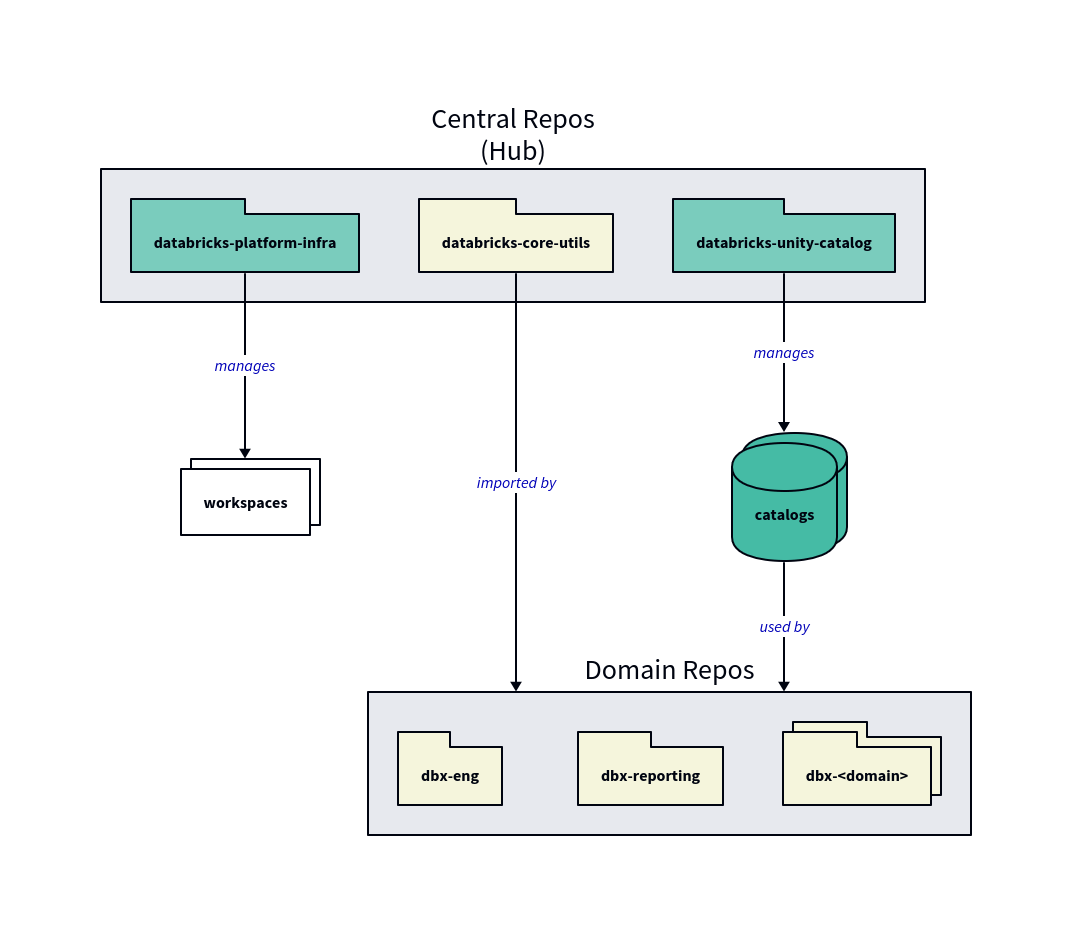
The repos above are an example of hub-and-spoke repo organization, and centralized platform administration. This works really well for both small and large organizations. And remember, just because one repo is central, doesn’t mean only 1 team can touch it — even extremely large enterprises can operate quickly in this model with decentralized teams.
For each repo, we’ll choose 1 of the following IaC tools for “how” it manages its respective resources:
Terraform / OpenTofu:
Account-level resources like metastores, network policies, workspaces, etc.
Cloud infrastructure like VPC networking, storage buckets, etc.
Core Unity Catalog resources like catalogs/external locations/storage credentials, etc.
Governed workspace resources like cluster policies, instance pools, workspace configs.
Declarative Automation Bundles (DABs):
Applications / workloads, like jobs, pipelines, apps, etc.
Lakebase projects, though these could be in Terraform too if you need tighter control / centralization.
Basically everything else that’s not listed under Terraform.
Repo Deep Dives
Let’s go deeper and see how each of these repos would work.
databricks-platform-infra
This is the foundation of the platform, a central repository for the Databricks account. It’s what creates workspaces, their VPCs, workspace configs, metastores, root S3 buckets for the workspaces, etc.
Naturally, this repo is entirely Terraform. A good structure for the configs in the repo usually separate account-level from workspace-level — we generally try to avoid having Terraform create a workspace and then immediately instantiate a workspace-level provider with that workspace in the same Terraform deployment.
modules/metastore/
workspace/(workspace deployment with its backing infra for a workspace, like VPC, subents, root bucket, etc.)
workspace-conf/(our standard workspace configs like IP ACLs)
(optional)
vpc-endpoint/(for privatelink to connect serverless to private networks)
cluster-policies/
<policy1>/
<policy2>/
…
instance-pool/
all-purpose-cluster/
sql-warehouse/
deployments/dev/(deploys modules for the workspace)
stage/(deploys modules for the workspace)
prod/(deploys modules for the workspace)
account/(account-wide resources like the metastore, VPC endpoints, account budgets, etc.)
This central repository is owned by the platform team(s). The repo does not change very often, but has a high blast radius because workspaces and their surrounding cloud infrastructure are the underpinning of everything our users depend on.
databricks-unity-catalog
This repo is also entirely Terraform, as it creates and manages UC catalogs, schemas (optionally), and the permissions for our earlier role-based groups.
Most organizations separate the admin responsibility of creating Groups in the IdP from the Unity Catalog grants. Ownership of Okta/Entra/IdP groups usually sits within IT organizations, as a vendor-agnostic responsibility. Although Terraform providers do exist for most IdPs, like Okta, it’s very uncommon for those to be handled in this repo or the same repo as our UC grants for those groups.
We want to use the DRY principle as much as possible; we could also have domain team leads come into this repo to request a new domain be setup self-service, simply by opening a Pull Request (PR).
For that reason, although Terraform is the IaC tool of choice, what I like to do is define a YAML config(s) to define everything we talked about previously in terms of Roles (groups) and Grants. We then use Terraform to read the YAML with file(), parse it with yamldecode(), then use the contents in the Terraform resources.
This can be very fun to design a YAML config for, because you get to be creative and also see everything we’ve discussed so far start to come together. An example YAML:
# File: domains.yml
domains:
  - eng
  - sales
  - reporting
# File: roles.yml
# Envs:
# Workspace environments
envs:
- dev
- stage
- prod
# REMINDER: 1 catalog is created per domain per env
# Format: <domain>_<env>
# Examples:
# eng_dev, eng_stage, eng_prod
# reporting_dev, reporting_stage, reporting_prod
# ...
# Roles:
# Created per catalog.
#
# Format: role.catalog.<catalog_name>.<role_name>
# Examples:
# role.catalog.eng_dev.writer
# role.catalog.eng_dev.reader
# ...
roles:
- name: reader
grants:
- USE_CATALOG
- USE_SCHEMA
- SELECT
- BROWSE
- READ_VOLUME
# ...
- name: writer
grants:
- MODIFY
- CREATE TABLE
- CREATE FUNCTION
- CREATE VOLUME
# ...
- name: admin
grants:
- MANAGE
- ALL_PRIVILEGES
# File: rolesets.yml
# Rolesets:
# Remember, this can (and often is) handled by IT teams, as an
# access request "collection" inside an access request tool like Opal.
# Showing here to re-illustrate the thought in unison with role memberships.
rolesets:
  - name: developer
    roles:
      - role.catalog.eng_dev.writer
      - role.catalog.eng_stage.writer
      - role.catalog.reporting_prod.reader
      - role.catalog.sales_prod.reader
      - role.sp.eng.dev
      - role.sp.eng.stage
  - name: marketing
    roles:
      - role.catalog.reporting_prod.reader
      - role.catalog.sales_prod.reader
   # ...
To onboard a new domain, such as a new team, product, BU, etc., with this clean abstraction all we have to do is add 1 line to domains.yml to register it and the rest follows our defined standards.
Reminder: with group creation being an IT-managed operation outside of these repos, the full user journey would be to 1) follow your IT process to create the
role.*groups, then 2) add your domain to thedomains.ymlfile.Because each new domain unfolds into several new groups to be created, it is recommended to define a template/form for these, although the implementation of that depends on your IT software (Opal/Service Now/Jira/etc.) which is outside of the scope of this guide.
databricks-core-utils
Back to the other repos! Next, is databricks-core-utils.
This repo could be optional, but it’s very common for engineering teams to have some code in common across domains. In a similar hub-and-spoke fashion, we can create this repo to build and maintain what is essentially a SDK for the organization.
These can be Python, SQL, Scala, a mixture — that’s up to your team and which languages you want to support in downstream domain repos.
Let’s say this is Python repo, and we have various utility functions/modules in it such as:
Standard logging util
Common company UDFs
Observability helpers
Config management helpers
Secret management helpers
…
Then we can package this codebase up as a Python wheel file, and publish it to a central Unity Catalog Volume which downstream domain teams/repos can utilize as a library.
Note: I’ve illustrated this repo as a “central” repo for this guide, but there’s no reason you couldn’t simply treat it like a separate “domain” too. Doing so may actually make more sense if the definition of “common” only applies to certain teams/domains, or each team wants to maintain their own helpers / SDK.
As for IaC in this repo, you technically don’t need any, except for maybe a thin DAB to manage the Unity Catalog Volume for storing artifacts (unless you already have an external artifact registry like CodeArtifact or JFrog).
dbx-<domain>
Finally, we have the per-domain repos. These are where jobs/pipelines and apps live, and so the IaC tool of choice should be DABs.
At this point, we’ve done our job of engineering a platform that teams can use effectively. Domain owners/teams have freedom to choose the design, language, tools, etc. inside these repos. They can (and should) even put multiple DABs in each domain repo; creating a new domain/repo for every single bundle would be overkill and very taxing on all teams.
Some guardrail worth mentioning though:
Cluster Policies
Service Principals
Cluster IDs / Warehouse IDs
We already built the cluster policies and shared compute (All-Purpose clusters and SQL Warehouses) in our central databricks-platform-infra repo, but domain repos should make use a DAB lookup to get the cluster policy ID by name, then use it in the DABs.
The Cluster Policy is the platform engineer’s best friend when we need to govern the compute that each domain can use. These policies help us do several things, including (but not limited to):
Enforce standard tags (env=prod, domain=reporting, cost_center=1234, etc.).
Restrict compute sizes.
Restrict which instance types can be used.
Limit which types of workloads can run on the cluster
Note: all purpose clusters should always be limited to interactive notebooks, never allowing jobs to run on them.
Limit the number of clusters that can be spun up with that policy.
Note: this is extremely useful if the policy is intended to allow users to create their own All-Purpose clusters.
Set a DBU cost limit.
Enforce that the cluster should be backed by a specific instance pool.
Much much more (any attribute at the cluster level).
Jobs to be Done
This guide was extensive, but there are still more topics you may wish to explore. This guide was simply too long to include them all:
CI/CD
Attribute-Based Access Control (ABAC)
OpenSharing
Central and/or per-domain Agent Skills
ML experimentation and Feature Engineering with representative production data
AI Governance with AI Gateway
Serverless controls
Workspace folders, like
/Domains/<domain>/and their permissionsRepo templates, using tools like copier
Build systems like uv, or even polyglot build systems like Pants, and Bazel.
Much, much more… isn’t platform engineering fun!?
Remember, a “domain” in our discussion is a very flexible word. Some of these additional topics you may consider implementing as a separate “domain”, while others make sense to sprinkle throughout the overall system.
If you liked this style of guide, feel free to let me know in the comments. I’d also love to hear your ideas and other real platform patterns you’ve used in your team!